Midify: Your Portable Music Composition Assistant
Screenshots


Introduction
Midify is an innovative music composition app developed by AIlMind, designed to enable musicians, whether beginners or seasoned professionals, to create and refine musical ideas on the go. With its lightweight MIDI editor and an integrated AI chat assistant, Midify allows users to sketch musical compositions quickly and efficiently. The app caters to a diverse audience, from hobbyists exploring their creativity to students learning the intricacies of music theory and professional composers capturing fleeting melodies away from their studios. Midify provides a seamless platform for writing and editing music, making the composition process intuitive and rapid.
Graphics & Gameplay
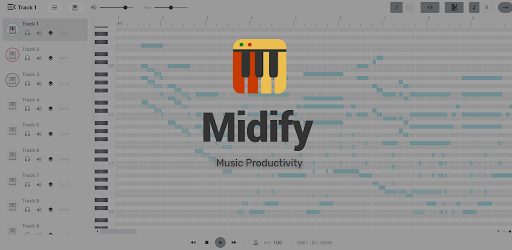
The user interface of Midify is sleek and user-friendly, showcasing a perfect blend of functionality and aesthetics. The piano roll is visually engaging, allowing users to easily draw notes and see their compositions unfold in real-time. This visual representation not only enhances the user experience but also simplifies the intricate process of music creation. The live sheet music view is another standout feature, presenting compositions as standard sheet music that is easy to read and share with others, making it an excellent tool for those learning music notation.
The screenshots depict a clean layout with vibrant colors that make navigation enjoyable. The piano roll is complemented by intuitive controls for editing notes, timing, and velocity, while the AI chat assistant is conveniently accessible, providing a chat interface that feels like a natural conversation. Overall, the graphics of Midify enhance its usability, making it a pleasure to compose music on a mobile device.
Key Features
- AI Chat Assistant: The built-in assistant is a game-changer for musicians. It offers context-aware suggestions for melodies, rhythm adjustments, and harmonic changes based on the user's current input.
- Piano Roll + ABC Notation: Users can write music visually through the piano roll or by typing notes using ABC notation (A–G), catering to different preferences and skill levels.
- Live Sheet Music View: This feature allows users to see their compositions represented as standard sheet music, facilitating better understanding and sharing of musical ideas.
- Audio-to-MIDI Conversion: Users can convert recorded audio (WAV files) into editable MIDI, enabling them to tweak and expand upon existing melodies easily.
- MIDI Editing Tools: Comprehensive editing tools allow for precise adjustments to notes, timing, and velocity, making it easy to bring compositions to life.
- Cross-Platform Sync: Midify is available on iOS, Android, Mac, and Windows, ensuring that users can start composing on their mobile devices and continue seamlessly on their desktops.
Mod Features
- Premium Unlocked: Enjoy all the advanced features without having to pay for a premium subscription. This includes exclusive access to enhanced AI suggestions and editing tools.
- No Ads: Experience uninterrupted creativity with an ad-free environment, allowing you to focus entirely on your music composition.
- Unlimited Money: Unlock all the premium features and tools from the get-go, providing a robust composition experience without any limitations.
- Enhanced AI Capabilities: Gain access to a more sophisticated version of the AI assistant that offers deeper insights and creative suggestions for complex compositions.
How to Install APK on Android
Installing the Midify APK on your Android device is straightforward. Follow these steps:
- Enable Unknown Sources: Go to your device’s Settings, select Security, and enable the option for installing apps from unknown sources. This allows you to install apps not found in the Google Play Store.
- Download the APK: Click on the download link for the Midify APK from the official website or trusted sources. Make sure to use the most recent version for optimal performance.
- Locate the APK File: Once downloaded, navigate to your device’s file manager and locate the downloaded APK file, typically found in the Downloads folder.
- Install the App: Tap on the APK file and follow the on-screen instructions to complete the installation process.
- Open Midify: Once installed, open the app and start composing your music. You may want to create an account or log in to sync your projects across devices.
With these simple steps, you’ll be ready to explore the world of music composition with Midify at your fingertips.
Ready to Get Started?
If you're eager to capture your musical ideas and elevate your composition skills, download Midify today from the link below: